Coldbet registration is one of the quicker casino sign-ups online — the form is compact, social login is supported, and CAD is a valid currency right out of the gate. Most of the friction shows up later, at the moment you try to withdraw, because first withdrawals trigger a full KYC check. The trick is to set everything up correctly on day one, opt into the right bonus, and upload documents before you ever need them. This page covers the full flow.
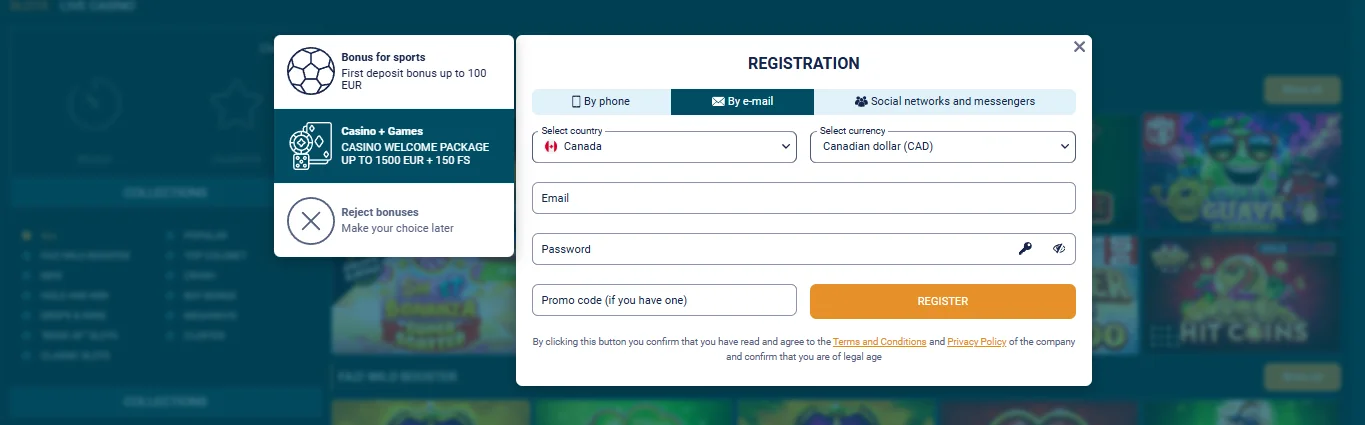
Before you click Register — three things to decide
1. Which bonus package do you want?
The single most important choice during Coldbet registration is the welcome bonus type. Casino + Games unlocks the 1,500 EUR / 150 FS four-deposit package. Sports unlocks the 500 EUR five-deposit package. Reject Bonuses skips the welcome entirely. Once you click Register, the choice is committed to your account. Switching later voids any remaining tiers. Read the bonus comparison if you are unsure.
2. Which sign-up method suits you?
Three options: by phone, by email, or by social network. Phone is fastest if you want to verify your mobile in one step. Email is the most common and works with every subsequent feature. Social supports Google, Apple, X, Discord, Twitch and Telegram — fine for quick access, but you will still need to complete profile details before the bonus credits. We recommend email if you intend to deposit and play seriously, because it gives you a stable login method independent of third-party account changes.
3. Do you have the promo code ready?
The promo code field appears at the bottom of the form. It has to be entered during registration — not after. The active welcome code locks in the full welcome package. Skipping the code forfeits the offer.
PROMOCOLD
Coldbet registration — step-by-step walkthrough
- Click Registration. The orange Registration button sits top-right of every page on the official site. Hit it and the modal opens with three tabs along the top: By phone, By e-mail, Social networks and messengers.
- Pick your welcome bonus. In the left column of the modal, click Casino + Games for the 1,500 EUR package or Sports for the 500 EUR package. The currently-selected option is highlighted in darker teal.
- Set country and currency. Canada should be the default if you are browsing from a Canadian IP. Under currency, pick Canadian dollar (CAD) to keep deposits and withdrawals on your home currency. You can use EUR or USD if you prefer — just know that card and e-wallet payments will incur an FX spread.
- Enter email and password. Password must be at least 8 characters with at least one number and one uppercase letter. Use a password manager — Coldbet supports long strings and has no artificial character limits.
- Paste the promo code. The field reads "Promo code (if you have one)". Paste it in without spaces. You will see the welcome bonus box above confirm the active offer.
- Accept the terms and confirm age. Tick the checkbox confirming you have read the T&Cs and Privacy Policy, and that you are of legal gambling age in your province. Registration will not proceed without this.
- Click Register. A verification email lands within a minute or two. Click the link inside it to confirm your address — your account becomes fully active at that point.
- Add and verify phone. Head to Account Settings after logging in, add your mobile number and submit it for SMS verification. The welcome bonus will not credit until this is complete.
- Complete the profile. Fill in first name, last name, date of birth and full address. Accurate details matter — they have to match the ID you will upload later.
- Upload KYC documents proactively. Navigate to the Verification tab in Account Settings and upload a government-issued photo ID and proof of address (utility bill, bank statement, lease — under 3 months old). Doing this before you win anything means your first withdrawal can process immediately instead of queueing behind verification.
Picking the right bonus during Coldbet sign up
Because this choice is locked the moment you click Register, it is worth spending an extra 30 seconds on it. The rough logic:
Pick Casino + Games if...
You primarily play slots, live casino, or in-house instant-win games. You are comfortable with x35 wagering inside 7 days. You plan to deposit actively across the first month. The 1,500 EUR cap is attractive enough to justify the tighter terms.
Pick Sports if...
You bet on NHL, UFC, NBA, NFL or European football. You like accumulators and can comfortably build 3+ leg tickets at 1.50+ odds. You want gentler wagering — x5 — and are fine with a smaller 500 EUR ceiling.
Pick Reject Bonuses if...
You plan to withdraw quickly without meeting wagering. You prefer clean, unencumbered deposits. You want flexibility to claim future recurring offers without finishing the welcome first.
Full wagering math, eligible games and clearing examples live on our Coldbet bonus page.
Common Coldbet registration problems (and fixes)
Verification email didn't arrive
Check spam. If it still isn't there after 5 minutes, the email address was likely mistyped. The registration flow doesn't warn you about typos. You will need to contact support to update the email on the account, which requires KYC completion.
"Account already exists" error
Coldbet tracks accounts by email, phone and IP. If you or anyone sharing your household IP previously registered, the system will flag a duplicate. You cannot bypass this by creating a second account — that violates the Fair Play terms and voids any bonus credited.
Promo code rejected
Double-check the spelling of the promo code you entered — no spaces, no dashes, case does not matter. If you still see an error, the most common cause is that the VPN is detecting a restricted region. Disable any VPN before registering from Canada.
Phone verification SMS doesn't land
Canadian carriers occasionally filter international SMS. Wait 5 minutes and click "Resend." If it still fails, switch the phone verification to the call-back option — Coldbet will read the code over an automated call instead.
What happens right after Coldbet registration
The moment you finish registration and log in, Account Settings opens by default on most browsers. This is a good thing — use it. Toggle on "Bonus Points for Placed Bets" so the loyalty program starts accumulating from day one. Set your communication preferences. If you plan to gamble on a budget, set deposit limits before you make your first transaction. All of these controls live in the Security and Responsible Gambling subsections.
From there, the obvious next step is to log in regularly and fund the account. The Coldbet login guide covers what to do if you hit issues signing back in. The payment methods page covers deposit and withdrawal options for Canada.
Coldbet registration FAQ
How long does Coldbet registration take?
Creating a Coldbet account takes about 2 to 3 minutes. The form itself is a handful of fields — country, currency, email, password and an optional promo code. Phone activation and full KYC verification can add another 5 to 10 minutes.
Can I register at Coldbet from Canada?
Yes. Coldbet accepts Canadian players. Select Canada as your country and CAD as your currency during sign-up. You will need a Canadian address, date of birth and a valid phone number for verification.
Do I need to verify my identity at Coldbet?
You can register, deposit and play without uploading documents, but the first significant withdrawal triggers a full KYC check. Upload proof of ID and address early to avoid delays when it is time to cash out. Most verifications clear within 24 hours.
Is the Coldbet sign up bonus automatic?
Yes, if you pick the Casino or Sports welcome during registration. The bonus credits with your first qualifying deposit. Selecting Reject Bonuses or skipping the preference means no welcome package will be applied.
What age do I need to be to register at Coldbet?
Registration requires you to be of legal gambling age in your jurisdiction. In Canada that means 18 in most provinces and 19 in Ontario, Alberta, British Columbia, Manitoba, Saskatchewan, New Brunswick, Nova Scotia, PEI, Newfoundland and the territories.