The Coldbet login form is compact and lives inside a dropdown at the top-right of every page. One login grants access to everything — casino, live casino, sportsbook, esports, in-house games, the promotions page and the Promo Code Store. There is no separate Coldbet casino login or sportsbook login. Once signed in, the session persists until you explicitly log out or clear cookies. On mobile the same dropdown expands from the header; on the app the equivalent screen loads at launch.
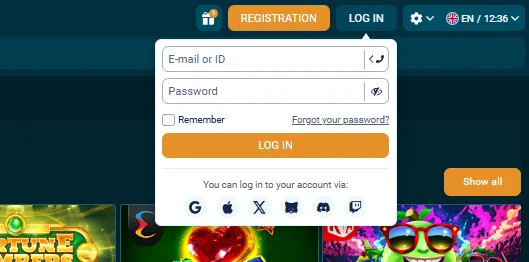
Standard Coldbet login — the three-field flow
- Click Log In. Top-right of every page on the Coldbet website, next to the orange Registration button. On mobile, the login option sits inside the hamburger menu.
- Enter your credentials. The first field accepts either your email address or your numeric account ID (the one you were given at registration). The password field has a visibility toggle on the right if you want to double-check what you are typing.
- Optional: check Remember. This keeps you signed in for 30 days on the current browser. Skip it on shared or public devices.
- Click Log In. The dropdown closes and your account balance appears at the top of the page.
Social and messenger login options
Under the main Log In button sits a row of social provider icons: Google, Apple, X (Twitter), Discord, Twitch and Telegram. These are one-click shortcuts that sign you in through OAuth without you having to remember a password. Two things to know: the social provider has to have been linked during registration (or later in Account Settings → Security), and you will still need to complete phone verification the first time you sign in this way.
The social login flow is typically faster than the email-password path, and it inherits whatever 2FA protection you have enabled on the social account itself. Google Authenticator users often prefer social login combined with their provider's own 2FA over Coldbet's native 2FA.
Forgot your Coldbet password?
- Click "Forgot your password?" on the login dropdown. The link sits directly under the password field.
- Enter the email on file. It has to match exactly what you registered with — a typo here just returns a generic "if this email exists" response without telling you something went wrong.
- Check your inbox. The reset email lands within 60 seconds. Subject line starts with "Coldbet" and comes from a noreply domain. Check spam if nothing shows up after 5 minutes.
- Click the reset link. It expires in 30 minutes — if it goes stale, request a new one.
- Set a new password. Minimum 8 characters, at least one number, at least one uppercase letter. Coldbet rejects passwords that match recent history.
- Log in with the new password. Session starts immediately; no email re-confirmation needed.
If you forget both email and password, support can recover the account from the phone number you verified during registration. Live chat inside the site is the fastest route — have your mobile ready for an OTP check.
Troubleshooting common Coldbet login problems
"Incorrect email or password"
Three-quarters of the time this is a wrong password, not an error on Coldbet's side. Copy your password into a text editor first to confirm no leading or trailing spaces. If you are certain the password is right, try the reset flow — it is faster than repeatedly guessing and triggering the rate limiter.
Login dropdown doesn't open
Usually a browser ad-blocker blocking the login modal's JavaScript. Add coldbet.com to your allowlist or open the site in an incognito window as a quick test. If the issue only happens on Safari, enable cross-site tracking for the domain.
"Too many login attempts"
Coldbet's anti-bot system locks the login form for 15 minutes after six failed attempts from the same IP. Wait it out — do not try the reset flow aggressively during that window, as it can extend the lockout. When access restores, use password reset once rather than guessing.
VPN flagged as suspicious
If you were travelling and logged in from a different country, Coldbet may prompt you to confirm identity via email or phone. Follow the prompt — this is normal. If you are using a VPN in Canada, consider switching it off for login even if you use it to browse otherwise, to avoid repeated identity confirmations.
2FA code not accepted
Your authenticator app's time is probably out of sync. In Google Authenticator, open Settings → Time correction for codes → Sync now. The next code generated should work. If you have lost access to your authenticator entirely, support can disable 2FA on your account after verifying identity via email, phone and a selfie with ID.
Enabling 2FA on your Coldbet account
Two-factor authentication is off by default. Turn it on at Account Settings → Security → Two-factor authentication. Scan the QR code with Google Authenticator, Authy or any TOTP app, enter the first 6-digit code to confirm the link, and save the recovery codes Coldbet provides in a password manager or printed somewhere offline. From that point on, every Coldbet login requires your password plus the current authenticator code.
We recommend enabling 2FA the moment you make a real deposit. The tiny inconvenience at login is nothing compared with the protection against credential stuffing attacks that target gambling accounts specifically.
Logging in via the Coldbet app
The mobile app handles login slightly differently. First launch prompts for email and password. Once authenticated, you can enable Face ID (iOS) or fingerprint (Android) in app settings, after which future sessions open instantly with a biometric check. The app remembers your login indefinitely unless you explicitly log out or the session expires after 30 days of inactivity.
Social logins work in the app too, with the same provider set as the web. If you previously signed in via Google on desktop, the Google button in the app opens the Google account picker on your device and authenticates in one tap. Full app installation details are on the Coldbet app page.
Coldbet login FAQ
How do I log in to Coldbet?
Click the Log In button in the top-right of the Coldbet homepage, enter your email or account ID and password, then press Log In. Alternatively, use one of the social logins — Google, Apple, X, Discord, Twitch or Telegram — that you linked during registration.
I forgot my Coldbet password — how do I reset it?
Click "Forgot your password?" on the Coldbet login form. Enter the email address linked to your account. A reset link arrives within a minute. Click it, set a new password meeting the strength requirements, and you will be signed back in.
Why can't I log in to Coldbet?
The most common causes are a wrong password, an email typo, an unverified account, or a VPN flagging your session. Clear browser cookies, disable any VPN, and confirm the email address matches the one on file. If problems persist, contact Coldbet support through live chat.
Is there a Coldbet casino login separate from sports?
No. Casino and sportsbook share one account and one login. Once signed in, you can move between the casino, live casino, sports, esports and in-house games sections using the top navigation without logging in again.
Does Coldbet support two-factor authentication?
Yes. You can enable 2FA via Google Authenticator or a similar TOTP app in Account Settings under Security. Once turned on, log in requires your password plus a 6-digit code from the authenticator. We recommend enabling it as soon as you fund the account.